WooCommerce only allows you to reply reviews from WordPress dashboard, by default. In this article, we will learn a simple way to enable any visitor to reply WooCommerce reviews from frontend, without plugin.
How to add frontend reply for WooCommerce reviews in – steps
1- Add reply button to WooCommerce reviews
First, we should add a reply button to the reviews. By clicking on the reply button, we will be able to write our reply and post it.
In doing so, we use the woocommerce_review_comment_text hook. As you see below, we defined a callback function named add_reply_button_to_wc_review and registered it with the aforementioned hook.
You should put this code in the functions.php file within your active theme’s directory:
//===============================================================================
// ===================== Add reply button to WooCommerce reviews ================
//===============================================================================
add_action('woocommerce_review_comment_text', 'add_reply_button_to_wc_review', 20);

function add_reply_button_to_wc_review()
{
    $post_id = get_the_ID();
    $comment_id = get_comment_ID();

    //get the setting configured in the admin panel under settings discussions "Enable threaded (nested) comments  levels deep"
    $max_depth = get_option('thread_comments_depth');
    //add max_depth to the array and give it the value from above and set the depth to 1
    $default = array(
        'add_below'  => 'comment',
        'respond_id' => 'respond',
        'reply_text' => __('Reply'),
        'login_text' => __('Log in to Reply'),
        'depth'      => 1,
        'max_depth'  => $max_depth
    );
    comment_reply_link($default, $comment_id, $post_id);
}
2- Set the depth of the reviews
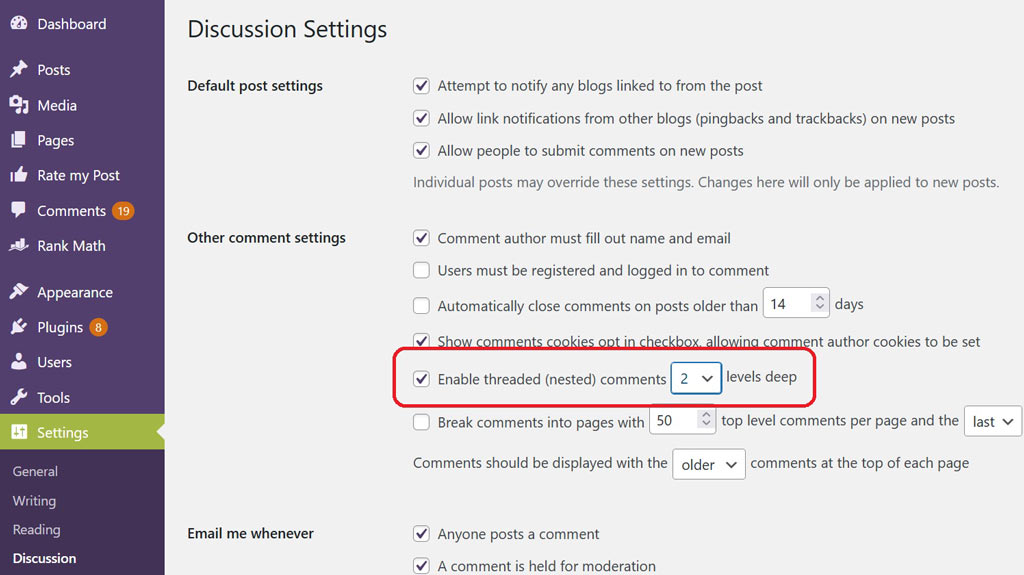
When we have a reply option, we usually want a certain depth. In other words, we may prefer to limit the level of indentation. In this example, we want the depth to be only 2, so the comments will stop to be indented after one indentation.
You could easily set the depth level from the WordPress Dashboard (Settings > Discussion > Other comments settings > Enable threaded (nested) comments X levels deep). Set this option to 2.
3- Disable the Rating for replies
We’re almost finished. But as you can see, when we want to reply, WooCommerce asks us to rate the product. This is not what we want. We only want the rating feature for the original reviews, not the reply.
To remove rating for replies, we need to to manipulate the reply form and remove some html code from it. In order to do so, we used some JQuery.
jQuery(document).ready(function ($) {

  // Used for saving the html code of rating within comment form
  var ratingHTML;

  // When we click on any reply buttons
  $(".comment-reply-link").on("click", function () {
    // Check if the html code of rating within comment form exists or not
    if (document.querySelector("#commentform .comment-form-rating > *:not(:empty)")) {
      console.log("Rating start element has children and they must be removed");
      // Save the html code of rating, because we need it later
      ratingHTML = $("#commentform .comment-form-rating > *").clone();
      // Remove the the html code of rating in DOM, because when we're replying
      $("#commentform .comment-form-rating > *").remove();
    } else {
      console.log("The html code of rating in DOM was already removed");
    }
  });

  // When we cancel the reply
  $("#cancel-comment-reply-link").on("click", function () {
    // We want the rating feature back, as we'll be writing a review, not a replying to a review
    // if (sacredCodeThemeData.isWooReviewRatingEnabled == 1) {
      $("#commentform .comment-form-rating").append(ratingHTML);
    // }
  });


});